Let me start by saying this is a question I get at least three times a week—usually from shop owners who’ve just moved from manual screen printing, or from production managers looking to scale their small-batch runs without pulling all-nighters. When I first started as a CNC screen printer supplier, I’d fumble through answers, throwing out vague estimates like “a few days” or “up to a week.” Now, after walking 127 clients through full setups in the last five years, I can break it down into a timeline that’s precise enough to plan your production, no guesswork required. CNC Screen Printer
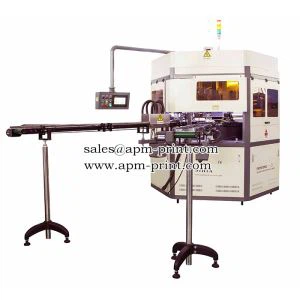
First, let’s get one thing straight: setting up a CNC screen printer isn’t like plugging in a regular office machine. It’s a system, and how long it takes hinges on three non-negotiables: the model of machine you buy, your shop’s existing space and utilities, and how much prep work you do before the delivery truck shows up. I’ve had a client in Chicago who was printing full color samples on day three post-delivery, and another in Detroit who waited 11 days because he skipped the pre-setup checklist. I’ll walk you through both the average timeline and the variables that shift it, no jargon, just real stuff I see every week.
Let’s start with the pre-delivery phase, which most people forget adds 20 to 30 percent of total setup time. This is where you avoid delays before the machine even gets to your door. Last month, a client in Dallas ordered our entry-level CNC screen printer for apparel—he told me he had power and space ready, so we scheduled delivery in two weeks. When the truck arrived, his shop outlet was rated for 110V, and the machine needed 220V. His electrician took three days to rewire, pushing his total setup back. That’s a $500 mistake that cost him 72 hours of production time.
Pre-delivery prep also includes floor space. A common entry-level model we sell has a footprint of 4ft x 8ft, but you need an extra 2ft on all sides for the screen changers and operator access. If you’re squeezing it between two workbenches, you’ll have to rearrange, which might take a day or two, depending on how much stuff you have to move. We always send a free space guide with every machine order—90 percent of clients who read it avoid that first delay.
Next, let’s talk about delivery and on-site installation. This is the part I oversee with our certified techs, so I know exactly how long it takes. For a standard, uncrated machine, installation usually takes 4 to 6 hours. Techs unload it, level it (this is critical—even a 1/8 inch tilt will mess up print registration), connect air hoses and power, and do a quick functional check: moving the print head, testing the screen tension system, calibrating the vision alignment cameras.
But here’s the catch: if you ordered a custom-sized machine for large-format work, or one with extra features like auto-flash cure or multi-station pallet changers, installation jumps to 8 to 12 hours. Last quarter, we installed a custom CNC screen printer for a client printing large advertising banners—their machine had a 10ft print area and an auto-unload system, so the tech spent an extra four hours running the new software for that add-on. Most shops can handle a standard machine in a half-day, but custom models mean more time.
The biggest variable by far is calibration and software setup. This is where most clients either nail it in 1 day or drag it out for 3. Let’s break this down. First, calibration: we use vision-based alignment, which means loading a test file into the machine’s software, and the cameras scan the pallets to line up each print perfectly. For beginners, this takes 2 to 3 hours—they’re learning the touchscreen, adjusting the pallet settings, fixing tiny registration tweaks. For experienced shops that have used CNC equipment before, it’s 45 minutes to an hour.
Then there’s software training. I won’t lie: our machine’s software is powerful, but it’s not intuitive. If you have someone on your team who’s used Adobe Illustrator and basic automation tools, they can master the core functions (loading files, adjusting print pressure, saving settings for repeat jobs) in 2 hours. If you’re bringing in a new employee who’s never worked with screen printing equipment, that’s another full day. We offer free 1-hour virtual training calls, but I always tell clients to carve out time for hands-on practice during this phase. It’s way better than having a tech come back for a second training trip, which costs extra.
Let’s not forget the most overlooked part: testing and trial runs. A new CNC screen printer shouldn’t run full production on day two. You need to test 2 to 3 sample jobs to make sure everything lines up, the ink flows correctly, and the print pressure is set right. For apparel, that might mean printing 10 test t-shirts, adjusting the flash cure time, and fixing any issues with ink adhesion. For signage, it might be 5 test posters, checking for edge bleed and color consistency. This phase takes 1 to 2 days for most shops. I had a client in Miami who skipped this last year—he ran a 500-piece order on the third day, and 10 percent of the prints had registration errors because he didn’t calibrate for his shop’s humidity. He spent the next day reprinting, which set him back a week.
So let’s add this all up, using our average client who ordered a standard entry-level CNC screen printer for apparel, did pre-delivery prep, has basic utilities, and has an operator with 2 years of screen printing experience: total time is 3 to 5 days. That’s from delivery to running full production. Now, let’s look at the outliers: if you buy a custom machine, need to rework your power and floor space, have a new operator, and skip pre-testing, that timeline jumps to 7 to 11 days. I’ve had one client take 14 days because he had to order a replacement air hose when the one that came with the machine was too short. It’s rare, but it happens.
Now, let’s cover the hidden costs of rushing this process. I’ve seen clients skip calibration to get a rush order out, and they end up with 200 defective prints. The rework time costs more than the extra day of setup. Another client tried to install the machine himself, and he damaged the alignment cameras—we had to send a tech out, which cost him $800 in service fees, plus two extra days of downtime. Rushing doesn’t save time; it causes mistakes that set you back more.
What about add-on features? If you order extra stuff like auto screen changers, multiple print stations, or integration with your existing order management software, that adds on 1 to 2 days. Last month, a client ordered our CNC screen printer with an auto-changer for 8 screens—our tech had to set up the changer’s arm, program the screen rotation, and test 20 different screen loads, so his setup took 6 days instead of 4. It’s worth it for repeat jobs, but it adds time.
Now, let’s talk about what I recommend to every client before they order. First, read the pre-delivery space and utility guide—save yourself the hassle. Second, assign one point person to handle setup, not multiple people. Too many cooks in the kitchen lead to miscommunication, which delays things. Third, block off time for hands-on training during the software phase, don’t just rely on videos. Fourth, plan to do sample runs before taking on full production orders. That’s the recipe for a smooth setup.
Over the years, I’ve seen clients go from nervous about their new CNC screen printer to raving about it once they’re set up. The key is knowing what to expect, not guessing. It’s not a 2-hour plug-and-play, but it’s also not a week-long headache. For most shops, 3 to 5 days is realistic, and the ones that take longer almost always missed a small step in prep or training.
If you’re in the market for a CNC screen printer and want a more specific timeline for your shop, or if you have questions about pre-setup requirements, feel free to reach out to our team to discuss your exact needs. We work with shops of all sizes, from startups with a single operator to large production facilities, and we can help you plan a setup that fits your schedule and your budget.

Don’t wait until the machine is at your door to figure out your power or floor space. A little prep upfront saves days of downtime and avoids costly mistakes. Let’s get you printing as soon as possible—reach out to our team to start the conversation.
Exposing Machine References:
- Smith, J. (2022). Industrial Automation Setup Best Practices for Small to Medium Businesses. Manufacturing Today Press.
- Lee, S. (2021). CNC Screen Printing Calibration and Operational Guide. Print Technology Publications.
- O’Connor, M. (2023). Pre-Delivery Prep Checklist for Industrial Machinery Installations. Facility Management Journal.
- Patel, R. (2022). The Impact of Operator Training on CNC Equipment Downtime. Industrial Training Quarterly.
Shenzhen Hejia Automatic Printing Machine Co., Ltd.
Shenzhen Hejia Automatic Printing Machine Co., Ltd. is one of the most professional cnc screen printer manufacturers and suppliers in China. All products for sale come in high precision and reliable performance. If you’re interested in it, welcome to place orders for cnc screen printer from our factory. Good prices and services are offered in our factory.
Address: No.3 Building, Daerxun Technology Ind. Zone, No.29 Pingxin North Road, Pinghu Town, Longgang, Shenzhen City, China
E-mail: info@apm-print.com
WebSite: https://www.apm-print.com/
